R and CSV files
When I deal with regional codes such as FIPS[1] and HUC[2], CSV file readers often mutilate my regions. Here is an example in R:

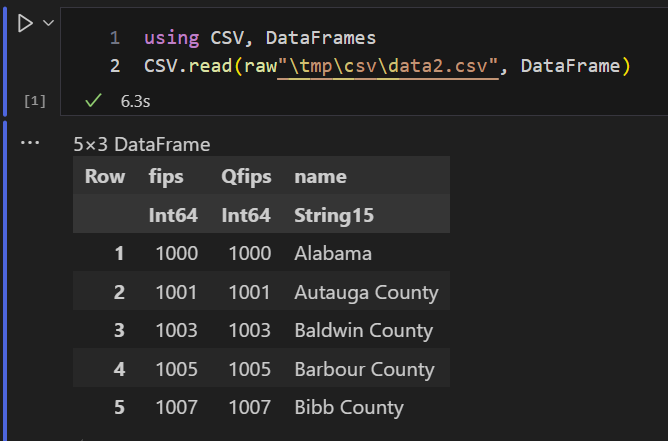
The leading zeros of the 5-digit FIPS codes are gone, as the CSV reader interpreted them as integers. This type conversion is applied regardless of whether the column is quoted. Obviously, these codes were never integers: writing integers doesn't lead to leading zeros.
The warning message can be fixed by inserting a newline after the last line. Under Windows, that newline would be the two characters CR-LF (Carriage Return + Linefeed). This is R, so we can also eliminate the warning message by changing the first line! Predictability is just boring.

We can fix the most important problem -- don't mutilate my data -- using the colClasses option.

However, I am more interested in default behavior here. Why? I receive a lot of data sets (including derived data such as shape files) with damaged region codes, so this seems to be a more structural problem. There is good reason to believe this is caused by using CSV files somewhere along the workflow. This is certainly a big issue when using data from different sources, some of which have correct region codes and others don't.
Excel and CSV files
Excel is doing a bit better. It doesn't truncate data without notice but gives a proper warning:

 |
| After Changed Type step |
 |
| Dropping Changed Type step |
Python


duckdb infers from the leading zeros that this is not an integer. Note that duckdb is also available under R.
Julia
SQLite

Conclusion
The only CSV readers that correctly import my example CSV file out of the box are the database systems SQLite and duckdb.
From this simple example, we can conclude that computing is really still in the Stone Age. CSV readers are happily ignoring leading zeros.
References
- FIPS County Code, https://en.wikipedia.org/wiki/FIPS_county_code
- Hydrologic Units Maps, https://water.usgs.gov/GIS/huc.html
- https://duckdb.org/